Blog ·
From FAQ Bot to Team Member: Building an AI Assistant That Does Real Work Inside a Web Application
Case study: how we build an AI assistant into a customer's web application that uses their own data and APIs to answer questions, check orders, reschedule bookings and raise tickets safely.
At a glance
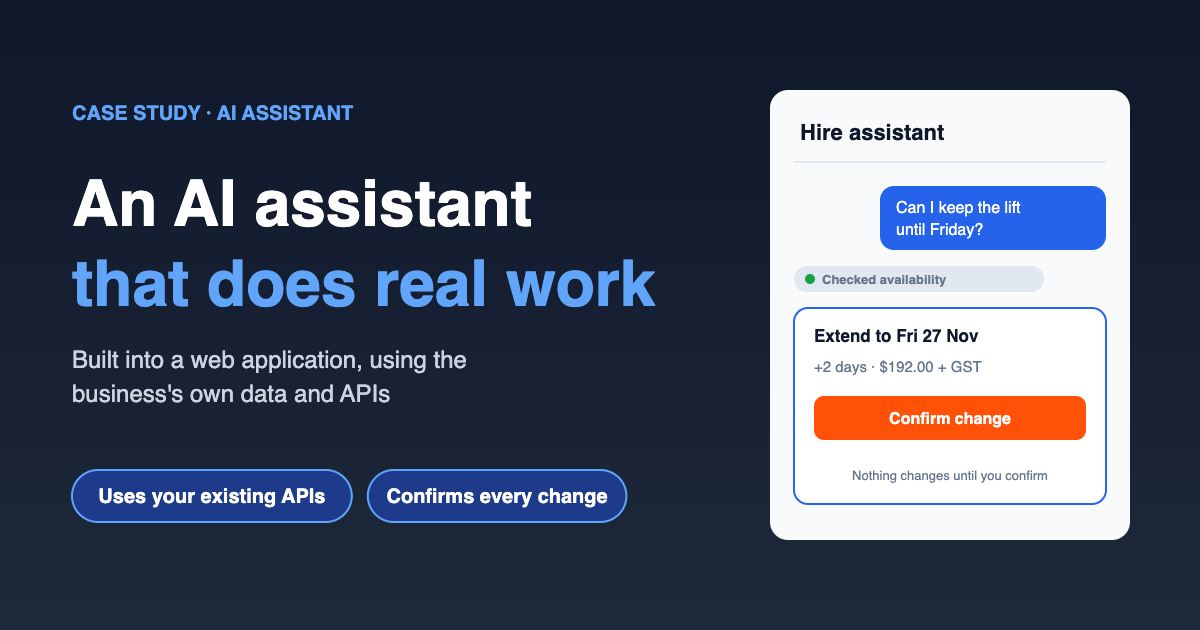
Most website chatbots can only answer questions. The assistant we built here can also act. It works inside the customer portal of a web application, uses the business's own data, and calls the same APIs the application already runs on. That lets it look up orders, reschedule bookings, resend invoices and raise support tickets, always as the logged-in user and never beyond what that user is allowed to do.
| Client | An equipment hire business with a customer portal and an internal operations system |
| Platform | An existing custom web application with its own REST API, plus Xero and a helpdesk |
| Starting point | A static FAQ page, a contact form, and a phone line that rings all day with "where's my order?" |
| Goal | Customers serve themselves for routine tasks, and staff spend their time on the work that needs a person |
| Approach | An AI assistant with tools mapped onto existing APIs, permission checks on every call, confirmation before any change |
| Delivery | Discovery, then a read-only pilot, then actions added one at a time |
The challenge
The business already had good software. Customers could log in, see their hires and pay invoices. The trouble was that customers didn't want to find the right screen. They wanted to ask.
- Repetitive enquiries: a large share of calls and emails were the same handful of questions. When is my delivery? Can I extend my hire? Can you resend that invoice? Do you have a scissor lift free next Tuesday?
- Answers spread across systems: bookings lived in the operations system, invoices in Xero, delivery windows in the scheduling module and policies in a set of PDFs. Staff had to check three places to answer one question.
- An earlier chatbot that disappointed: a scripted widget had been tried and removed. It could only match keywords to canned answers, and customers learned to type "agent" straight away.
- Hard requirements: customers must only ever see their own data, nothing can change without the customer agreeing to it, and the business must be able to see exactly what the assistant did and why.
Our approach
The key decision was to build the assistant on top of the application's existing API, not beside it. The web application already enforced who could see and change what. Rather than give the AI its own database access, we gave it a small set of tools that call the same endpoints the portal's own screens use, with the logged-in customer's session.
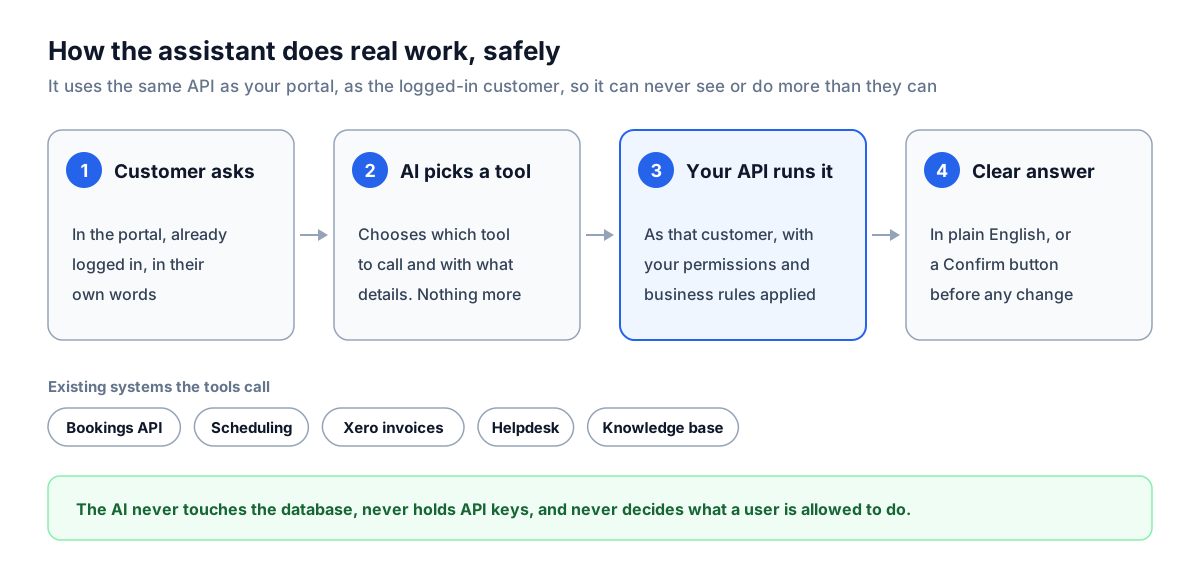
That gives three properties almost for free:
- The assistant can't see more than the customer can. If the API won't return another customer's booking to the portal, it won't return it to the assistant either.
- Business rules stay in one place. Minimum hire periods, cut-off times and credit holds are already enforced by the API, so the assistant can't talk its way around them.
- Everything is auditable. Every tool call is logged with the user, the inputs, the API response and the conversation it came from.
The AI model itself never touches the database, never holds API keys, and never decides what a user is allowed to do. It decides which tool to call and how to explain the result. The application does the rest.
Phase 1: Discovery and the tool list
We started with a week of listening, not building. We reviewed a few hundred recent enquiries across email, the contact form and call notes, grouped them by what the customer actually wanted, and matched each group to an existing API endpoint.
The result was a short, deliberate tool list. Each tool is a thin wrapper around an endpoint that already existed, with a plain-English description the AI uses to decide when to call it.
| Tool | Existing system it calls | What it does | Changes data? |
|---|---|---|---|
search_help_articles | Knowledge base (policies, FAQs, equipment guides) | Finds the relevant passages and cites them | No |
list_my_bookings | Operations API, bookings endpoint | Lists the customer's current and upcoming hires | No |
get_delivery_window | Scheduling module | Returns the delivery or pickup window for a booking | No |
check_availability | Operations API, availability endpoint | Checks whether equipment is free for given dates | No |
list_my_invoices | Xero, through the existing integration | Lists invoices with status and amount owing | No |
resend_invoice | Xero, through the existing integration | Emails a copy of an invoice to the account's billing contact | Yes, needs confirmation |
extend_or_reschedule_booking | Operations API, bookings endpoint | Requests new dates for a booking | Yes, needs confirmation |
create_support_ticket | Helpdesk API | Raises a ticket with a summary of the conversation | Yes, needs confirmation |
hand_off_to_staff | Helpdesk and live chat | Passes the conversation to a person with full context | Yes |
Just as important was what we left out. There is no tool to cancel a hire, change payment details, apply a discount or edit an account. Those stay with staff. If a customer asks, the assistant explains how to get it done and offers to hand over.
Phase 2: Answers from the business's own information
Before the assistant could act, it had to answer well. We loaded the business's own material into a searchable knowledge base:
- Hire terms and conditions, damage and cleaning policies
- Delivery areas and cut-off times
- Equipment guides, such as weight limits, power requirements and licence requirements
- The existing FAQ page, rewritten where it was out of date
When a question is about policy or equipment, the assistant searches this knowledge base first and answers from what it finds, with a link to the source. If it can't find a clear answer, it says so and offers to pass the question on, rather than guessing. That one rule did more for customer trust than anything else.
Example: a policy question
Customer: If I bring the excavator back a day early do I get a refund for that day?
Assistant: Under the hire terms, returns before the end of a minimum hire period aren't refunded, but for hires longer than a week, early returns are credited at the daily rate for each full day returned early. Your excavator hire is 10 days, so returning it a day early would be credited. Hire terms, section 4.2
Would you like me to request an earlier pickup?
Phase 3: Read-only pilot
The first release could look things up but change nothing. That let the business see real conversations, check accuracy, and tune the tool descriptions before anything had consequences.
Example: one question, three systems
Customer: When's my scissor lift arriving and do I owe you anything?
Assistant: Your 19 ft electric scissor lift (booking HB-20418) is scheduled for delivery tomorrow between 7:00 and 9:00 am to the Mile End site.
You have one open invoice, INV-3392 for $1,184.70, due on the 28th. Everything else on the account is paid.
Behind that answer, the assistant called list_my_bookings to find the active hire, get_delivery_window for that booking, and list_my_invoices for the account. That's three systems that a staff member would previously have checked by hand while the customer waited on the phone.
During the pilot we reviewed conversations every day and kept a test set of real questions with known correct answers. Whenever the assistant chose the wrong tool or explained something poorly, we fixed the tool description or the instructions and re-ran the full test set, so a fix in one place didn't break something elsewhere.
Phase 4: Letting it act, safely
Once the read-only assistant was reliably accurate, we added the tools that change things, one at a time. Every one of them follows the same pattern: the assistant proposes, the customer confirms, the application executes.
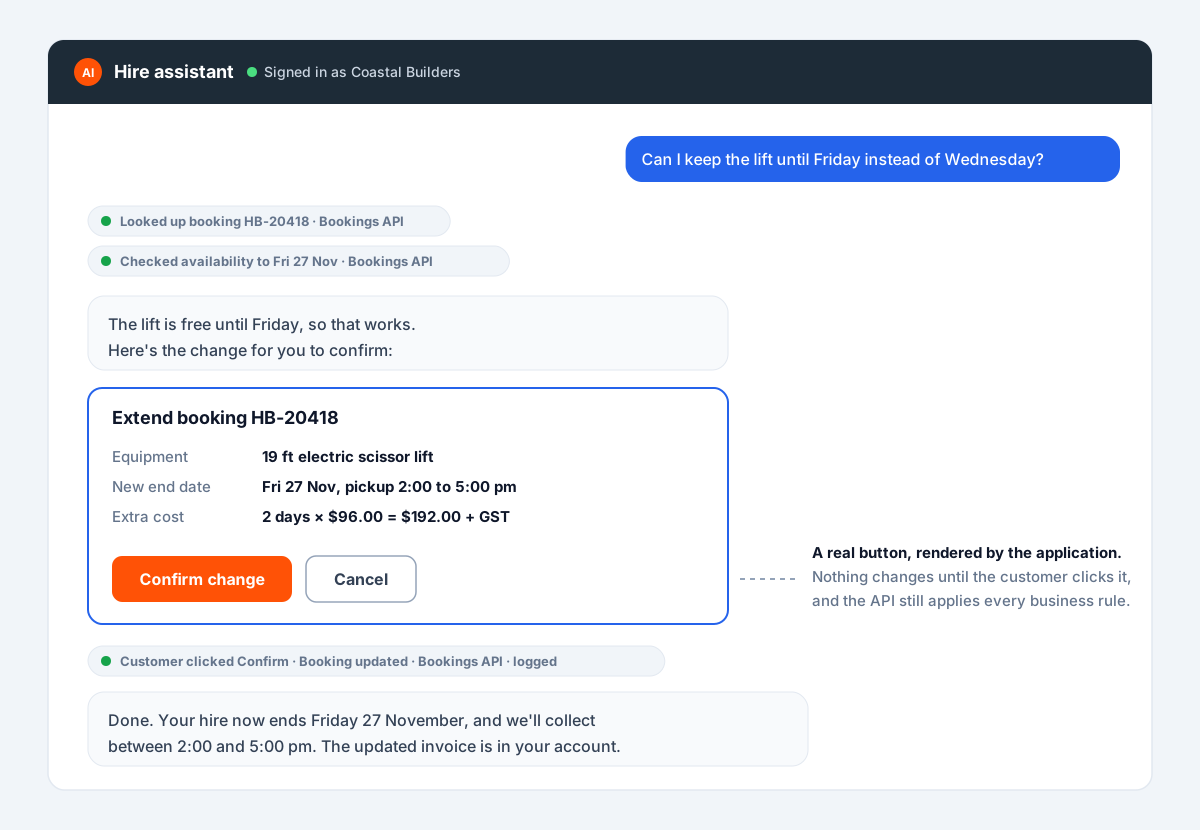
An illustration with sample data. The customer asks to keep a scissor lift two days longer. The assistant looks up the booking, checks the lift is free, and shows the new end date and extra cost before anything changes.
The confirmation isn't a polite question from the AI. It's a real button rendered by the application. The change is only sent to the bookings API when the customer presses it, and the API applies all its usual rules at that moment. If the hire can't be extended, for example because the equipment is reserved by someone else, the API refuses and the assistant explains why.
Example: knowing when to hand over
Customer: The generator you delivered won't start and the crew is standing around.
Assistant: Sorry about that, I'll get someone onto it straight away. I've raised urgent ticket #7731 with your booking, the site address and what you've told me, and passed you to our service team. While you wait: the generator has a fuel shut-off valve on the left side panel that's sometimes closed for transport. It's worth checking it's open.
Connecting you to the service team now.
Anything urgent, anything involving damage or safety, and anything the customer is unhappy about goes to a person, with the full conversation attached so the customer never has to repeat themselves.
The staff side
The same assistant runs inside the internal operations system, with a different set of tools based on the staff member's role. Staff use it to ask questions that previously meant running a report or opening several screens:
- "Which hires end this week and haven't booked a pickup?"
- "Show me overdue invoices over $5,000 and the last contact we had with each customer."
- "Summarise everything that's happened on the Henley Beach job."
Because the tools still go through the application's permissions, a depot coordinator sees depot data and the finance team sees invoices. The assistant doesn't widen anyone's access.
Safeguards
These are built into every assistant we deliver, not added at the end.
- Acts as the user, never as an administrator. Every tool call carries the logged-in user's session and is checked by the existing API.
- Confirmation for every change. Anything that changes data, sends something or costs money needs an explicit click from the user.
- A short, deliberate tool list. The assistant can only do what it has a tool for. Risky actions simply don't exist as tools.
- Content treated as data. Text from emails, tickets, documents or user input is read, never obeyed. Instructions hidden in a document can't make the assistant call a tool.
- Answers from sources, or a handover. Policy answers cite the knowledge base. If there's no clear source, the assistant says so instead of guessing.
- Full audit trail. Every conversation and tool call is logged and searchable by the business.
- Data handling agreed up front. We agree which data the assistant can use and where it's processed, using business-grade AI services that don't train on customer data.
- Tested before every release. A test set of real questions runs against each change before it goes live.
What we measure
We agree the success measures with the business before the pilot starts, then report on them from the logs:
- Resolution rate: how many conversations end with the customer's question answered or task done, without a handover
- Task completion: how many proposed changes are confirmed and succeed at the API
- Handover quality: whether staff had what they needed when a conversation reached them
- Accuracy: the share of the test set answered correctly, tracked across every release
- Customer feedback: a simple thumbs up or down on each answer, reviewed weekly
Those numbers decide what we build next. A common pattern is that the first few tools handle the bulk of routine enquiries, and the logs then show exactly which request to automate after that.
Lessons
- Build on the API you already have. If your application already enforces permissions and business rules, the assistant should go through them, not around them. It's both safer and much faster to build.
- Start read-only. A pilot that can't change anything earns trust quickly and shows you where the real demand is.
- Fewer, clearer tools beat many vague ones. Most accuracy problems turn out to be unclear tool descriptions, not a weak model.
- The confirm button belongs to the application. Don't rely on the AI to ask nicely. Make the change impossible without the user's click.
- Plan the handover as carefully as the automation. Customers forgive a bot that passes them to a person with full context. They don't forgive one that traps them.
Could this work in your application? If your web application has an API, or can have one, it can usually support an assistant like this. Talk to us about AI solutions and we'll tell you honestly where it would help and where it wouldn't.
For the internal side, see how we put an AI assistant inside an ERP so staff can ask about stock, sales and purchasing in plain English.