Quotes Drafted From Your Own Past Quotes
Quote Box learns how your business quotes: your wording, your prices, your terms. When a new enquiry arrives it drafts the quote and the email in your style, asks your team about anything it can't work out, and remembers the answer for next time. A person checks and approves every quote before it goes anywhere.
- Learns from your past quotes emails, PDFs and documents, so drafts sound like you and price like you
- Asks instead of guessing. Anything it can't work out becomes a question for your team, answered once and remembered
- Connects to your mailboxes in Microsoft 365 or any IMAP mail server
- A person approves every quote. Nothing is sent to a client automatically
Every Quote Starts From a Blank Page. It Shouldn't.
Most service businesses have quoted the same kinds of jobs hundreds of times. The answers are all there: in sent emails, old PDFs, price lists and the heads of a couple of senior people. But each new quote still means digging out a similar one, checking what you charged last time, and rewriting the same paragraphs.
Quote Box turns that history into a working knowledge base for your business, so the first draft is already most of the way there and your team spends its time checking, not retyping.
How Quote Box Works
From your first imported quote to a new one approved and sent.
Connect your mailboxes
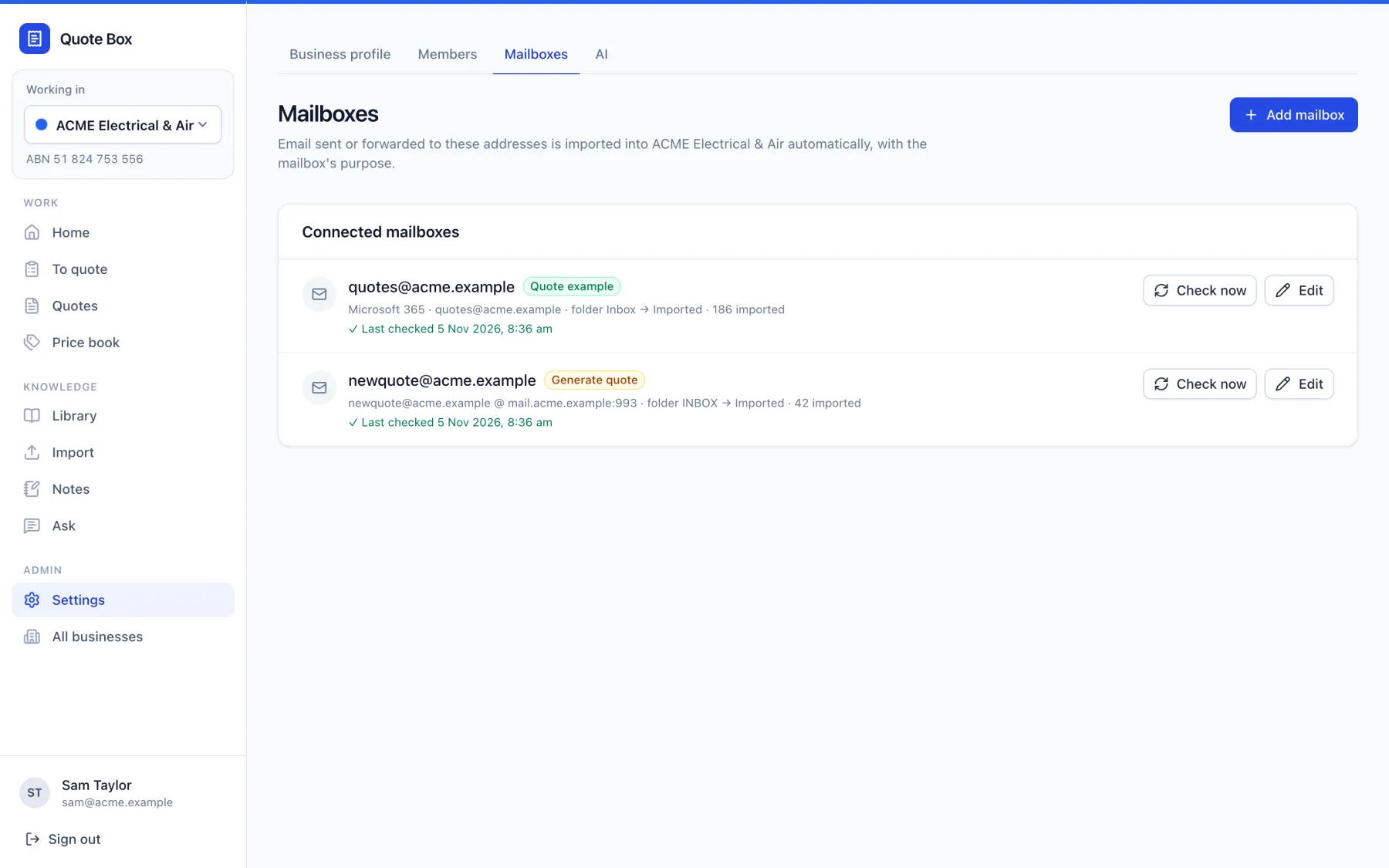
A quotes@ mailbox for finished quotes and a newquote@ mailbox for new enquiries, in Microsoft 365 or any IMAP mail server. BCC or forward to them, or set an Outlook rule.
Train on your existing quotes
Import past quotes, email threads and PDFs. Quote Box reads each conversation, pulls out the line items, prices, terms and outcome, and builds a price book from what you actually charged.
Add your standard documents
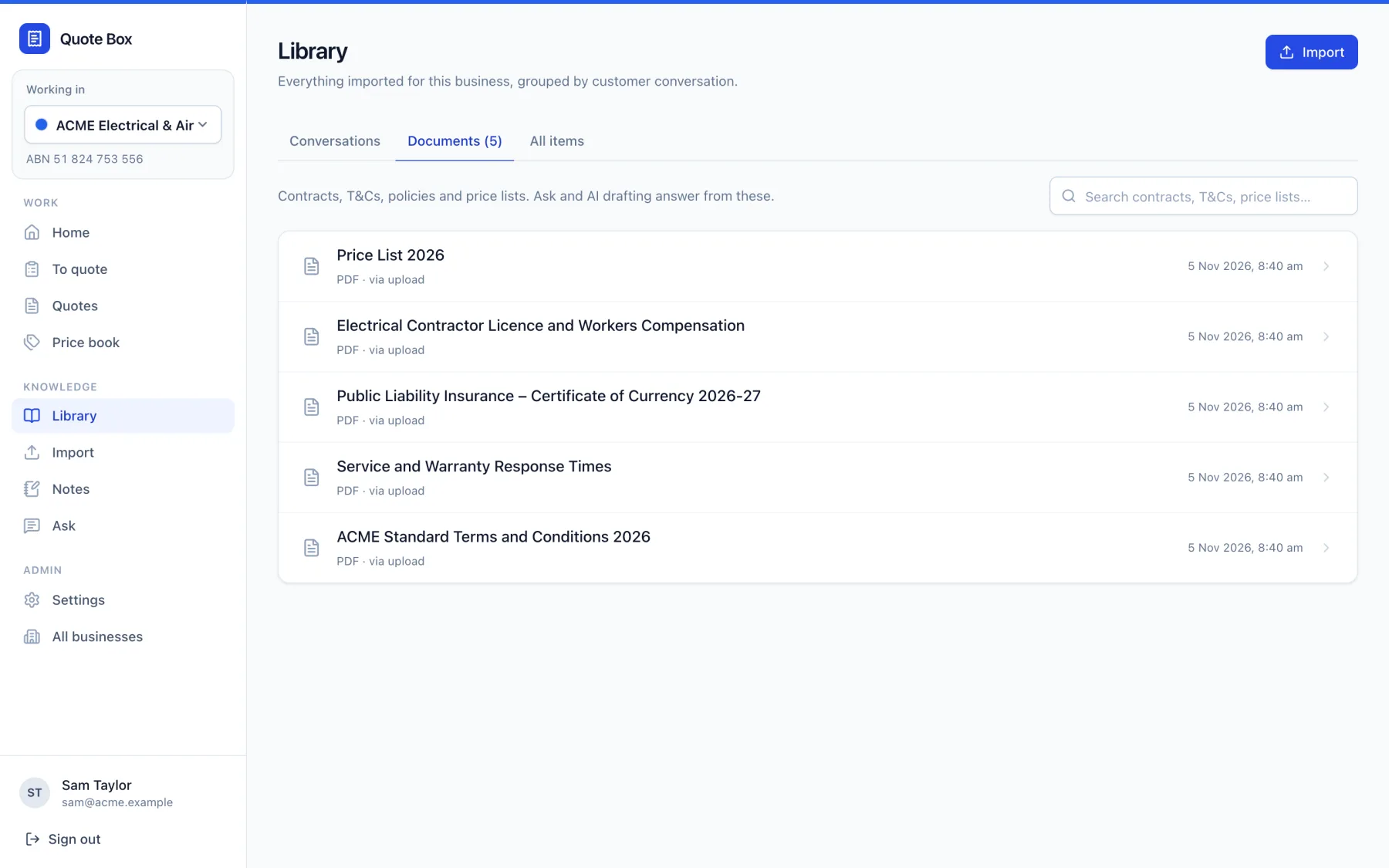
Terms and conditions, insurance certificates, licences, warranty terms, price lists and policies. Drafts and answers draw on them, with the source shown.
New enquiries are drafted
A new enquiry is summarised and drafted in your wording, with every price showing where it came from: past quotes, the price book or your team's answers.
Your team answers what it couldn't
Anything missing comes back as a short list of questions. Answer them, check the library for the answer, or let it estimate. Answers are kept for future quotes.
Approve, send and track
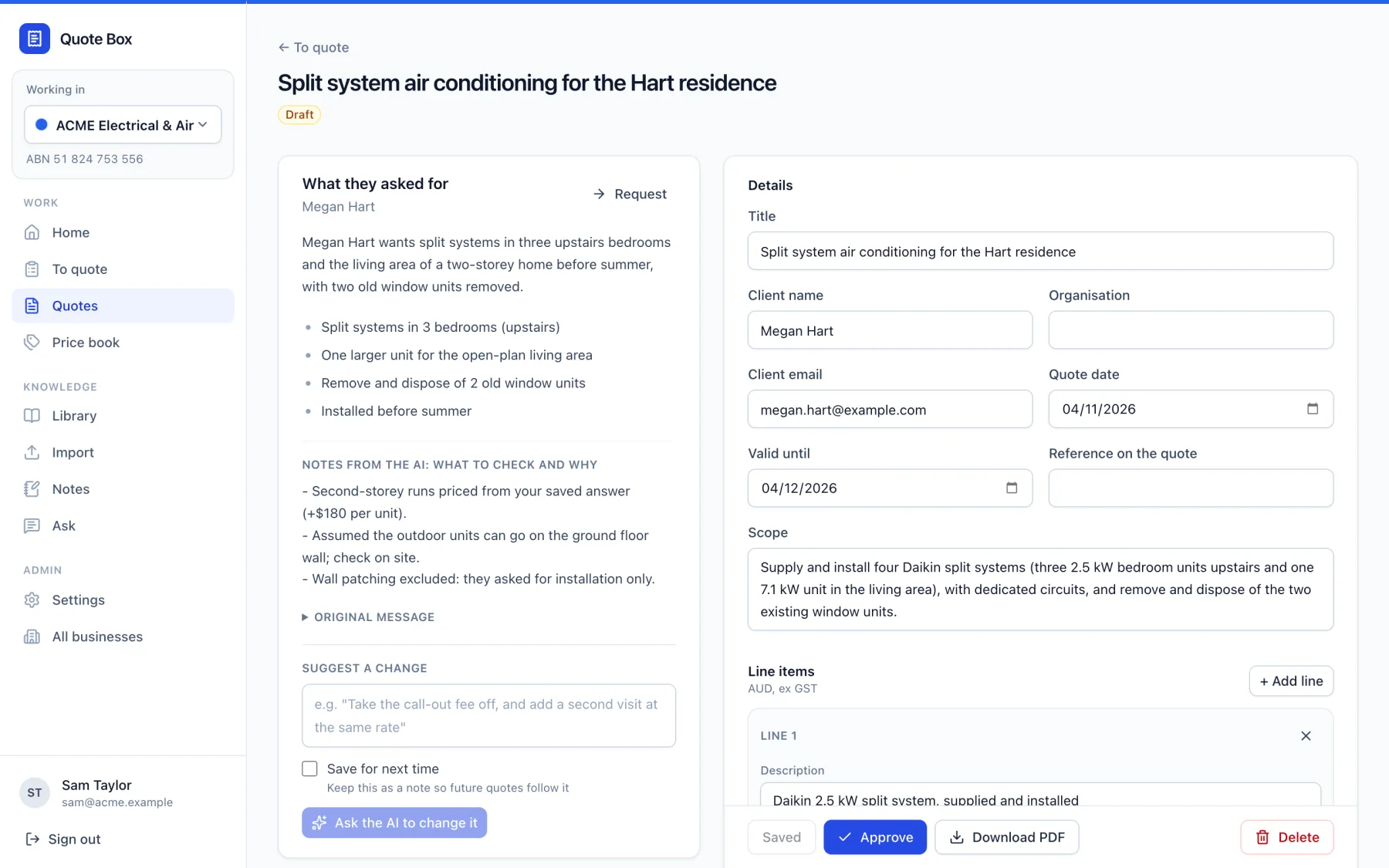
Review the quote side by side with what the client asked for, approve it, and send the branded PDF and email yourself. Track every quote through to won or lost.
Microsoft 365, IMAP, and Nothing to Change in How You Work
Quote Box watches dedicated mailboxes and imports what arrives. Each mailbox has one job: finished quotes your team sends become examples to learn from, and enquiries forwarded to the new-quote mailbox are drafted.
For Microsoft 365, Quote Box reads a shared mailbox through Microsoft Graph, and Exchange limits its access to that mailbox alone. It can't see anyone's personal mail. Shared mailboxes need no extra licence. Any other provider works over IMAP, with the same details a mail app uses. Google Workspace support is on the way.
- BCC quotes@ when you send a quote, or forward old ones
- Forward enquiries to newquote@, or redirect them with an Outlook rule
- Forwards are unwrapped and email threads are joined into one conversation per job
- Imported mail is filed into an Imported folder, so nothing is read twice
Your Quoting History, Put to Work
Start by importing the quotes you have already sent: email threads, Word and PDF quotes, or pasted text. Quote Box follows each job from first enquiry to acceptance, so it learns the price you settled on, not the first draft.
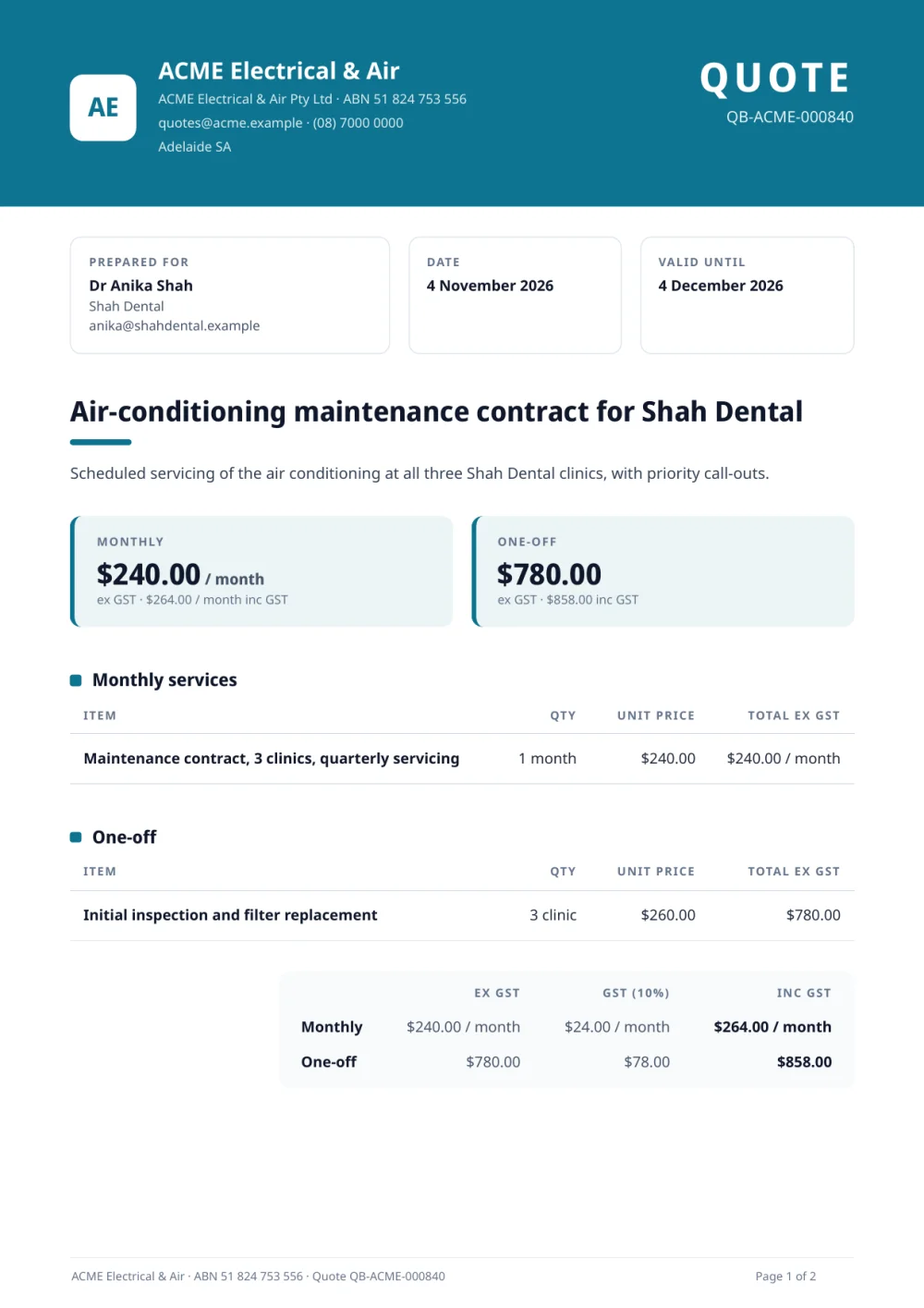
Every line it drafts shows its working, like "Same as 4 jobs in 2026, median $1,690 installed (3 won)", and prices you confirm go into a price book that stays current.
- Line items, prices, billing periods and terms read from each quote
- Won and lost outcomes, so it can tell what worked
- Prices kept ex GST, with GST added when it is shown
- Quotes it is unsure about are flagged for a person to check
Every Enquiry, From First Email to Won
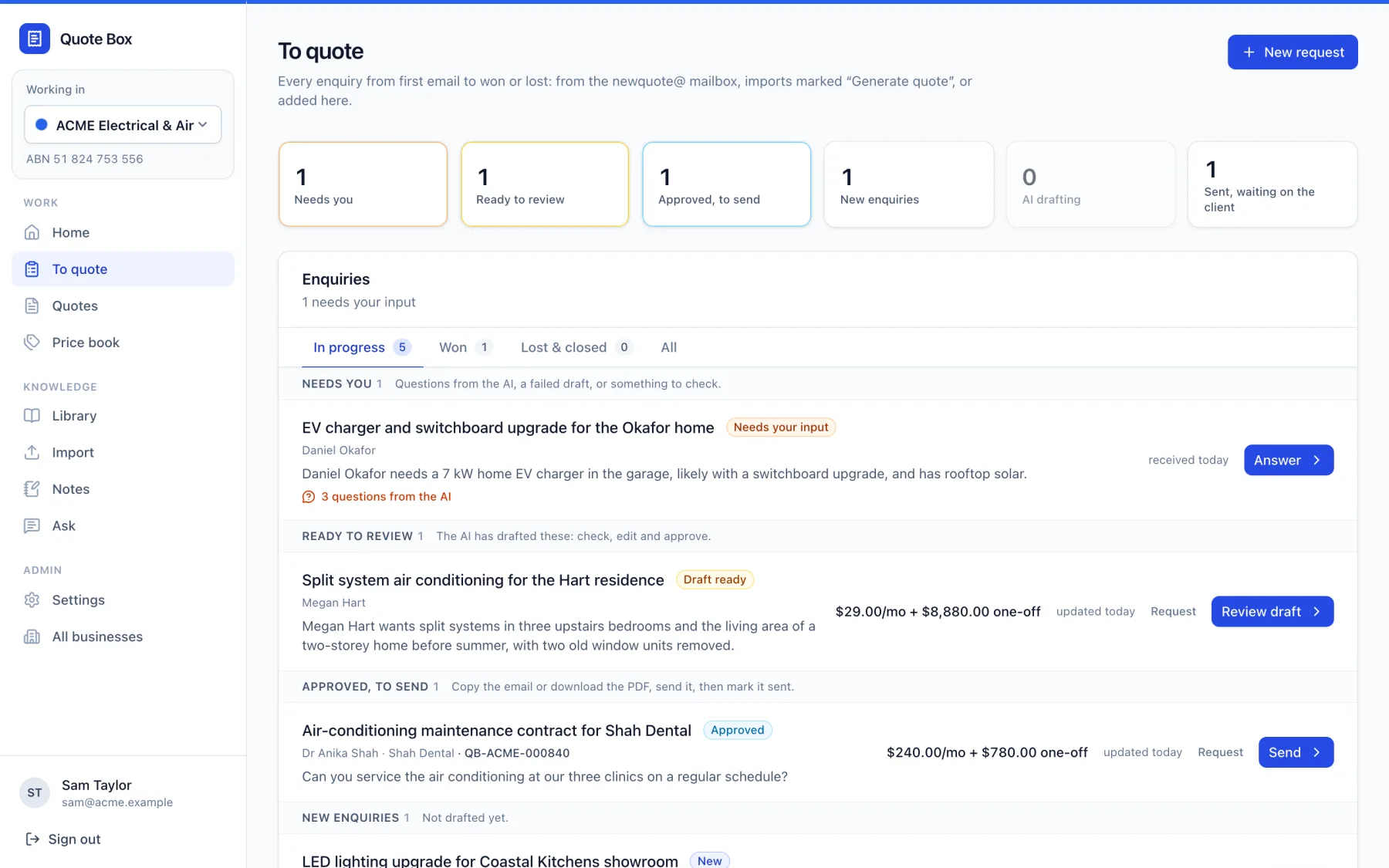
New enquiries are read and summarised as they arrive, then drafted: the line items, the scope, your standard inclusions and exclusions, and an email ready to send in your style.
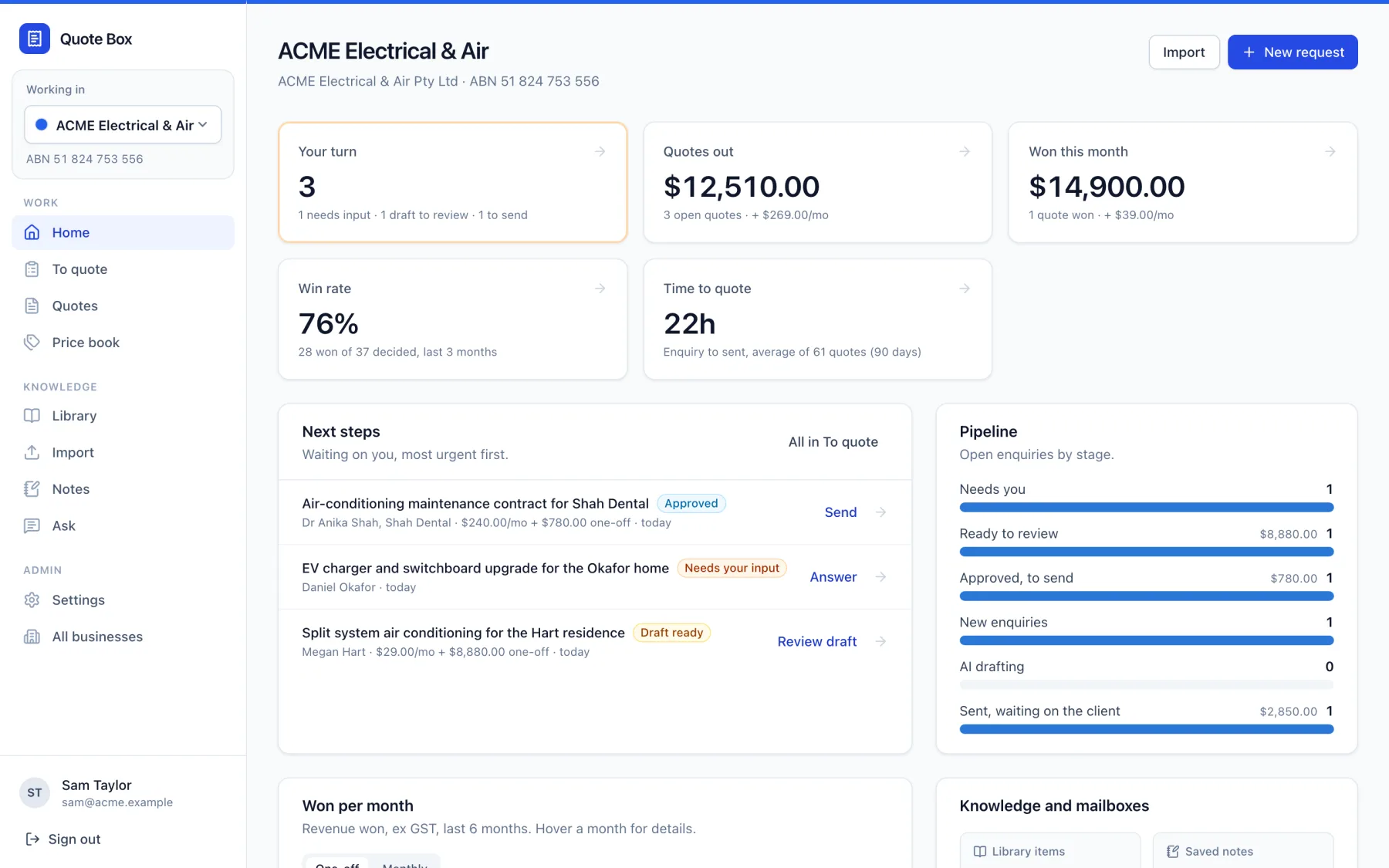
The To quote page shows where every enquiry is up to, with the next step on each one: answer questions, review a draft, send it, or record the outcome. Quotes sent more than two weeks ago without an answer are flagged for a follow-up.
- Drafts sit beside what the client asked for, with the AI's reasons for any choice that isn't obvious
- Ask for a change in plain words ("take the call-out fee off and add a second visit") and the whole quote is revised to match
- Branded PDFs with your logo and colours, and your official quote numbers
- A dashboard of quotes out, wins, win rate and time to quote
When It Can't Work Something Out, It Asks
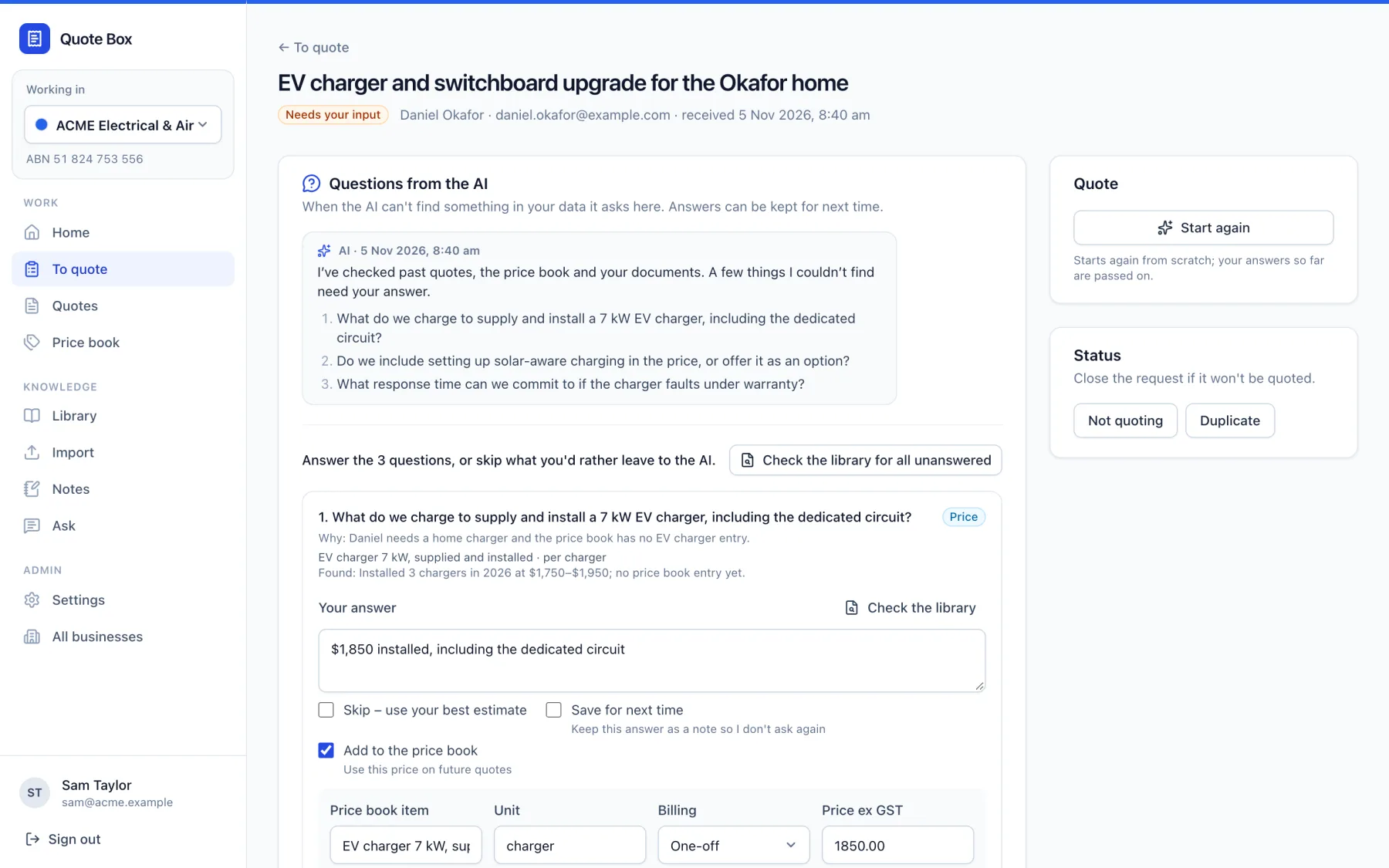
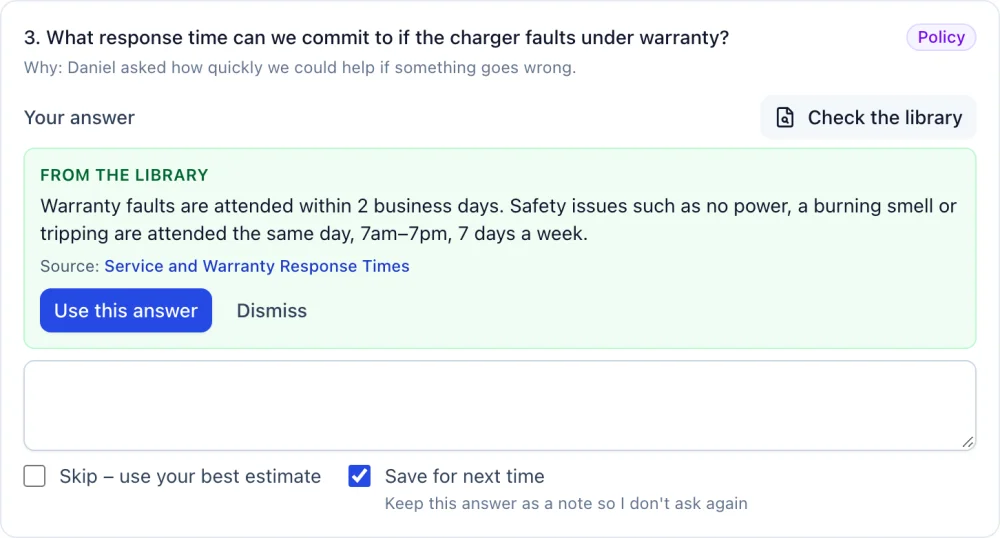
Rather than guess a price or a policy, Quote Box lists what it couldn't find, with why it is asking and what it found so far. Your team answers in a few words, skips what they would rather leave to its judgement, and can save answers in progress to finish later.
Each answer can be kept as a note, and prices go straight into the price book. Next time a similar enquiry comes in, it already knows and doesn't ask again.
- "Check the library" finds the answer in your documents, with the source
- Answers saved as knowledge notes your team can review and edit
- Prices added to the price book with the date they apply from
- Ask follow-up questions in a chat on each enquiry
Learns From Your T&Cs, Insurance and Policies
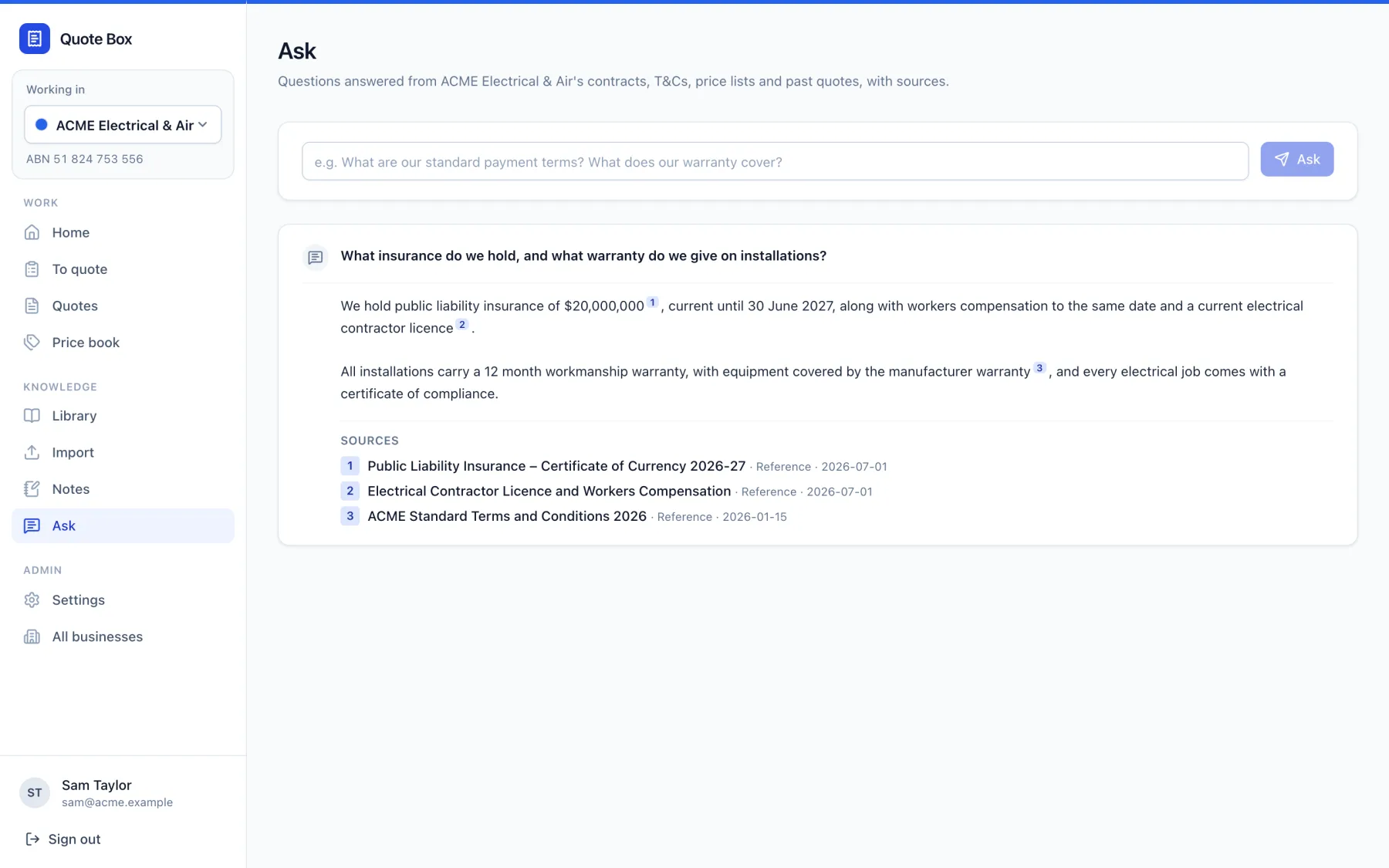
Upload your standard terms and conditions, insurance certificates of currency, licences, warranty and service terms, price lists and contracts. Quote Box uses them when it drafts, and your team can ask questions of them in plain English.
Every answer cites the document and the passage it came from. If your documents don't say, it tells you rather than making something up.
- PDFs, Word documents and scanned files (read with OCR)
- "What insurance do we hold?" answered with the certificate it came from
- Notes from earlier answers treated as current policy
- Also available in Claude Desktop, so your team can ask from there
AI That Works For Your Team, Not Around It
Quote Box drafts; your people decide. It was built for businesses that care how their quotes read and what they commit to.
You Approve Every Quote
Quote Box drafts; a person reviews, edits and approves. Quotes and emails are sent by your team, never automatically.
Questions, Not Guesses
Missing prices and policies become questions for your team, and estimates are clearly marked for checking.
Access Kept Tight
Microsoft 365 access is limited to the quote mailboxes, and each business's data is kept separate.
Your Own AI Key
AI runs on your Anthropic account, billed to you at cost, and your data isn't used to train their models.
Pricing
Quote Box is set up with your team, not handed over as a login. Every business starts with onboarding, so it knows your quotes, prices and documents from day one.
Quote Box
From $150/month + GST
Plus onboarding, quoted to suit your team.
- Quote Box for your business and team
- Hosting, backups, updates and support from our Adelaide team
- Microsoft 365 and IMAP mailbox connections
- Branded quote PDFs with your logo and colours
- Use with Claude Desktop for your team
Onboarding with your team
- Setting up your quote and new-quote mailboxes, including Microsoft 365 access
- Importing and checking your past quotes
- Loading your T&Cs, insurance, licences and price lists
- Your branding, quote numbering, payment terms and email signature
- Training your team on reviewing, answering and approving
Your own AI key
Quote Box uses Claude from Anthropic. You provide your own Anthropic API key, so AI use is billed by Anthropic directly to you with no markup, and you can see exactly what it costs. Quote Box shows the spend each month. Under Anthropic's commercial terms, your data isn't used to train their models.
Quote Box: FAQ
See Quote Box With Your Quotes
Tell us what you quote and how enquiries reach you. We will show you Quote Box working and talk through what onboarding would look like for your team.
Meet with us at our Prospect office or online.
1/132 Prospect Road, Prospect SA 5082
Prefer to talk? Call (08) 7081 1100
How Long Does Your Next Quote Take?
Put your past quotes to work. We will set Quote Box up with your team and have it drafting in your style.